 patternihaandClaude Opus 5.5
f2f292c90c
patternihaandClaude Opus 5.5
f2f292c90c
"dns" in autoSystemWfpBlockLeak only blocked port 53 outside the TUN, plus
the DNS Client service on Windows 11 and Server 2022 and later, so other
programs' DNS over TLS (TCP 853) and DNS over QUIC (UDP 853) could still
leave outside the TUN.

autoSystemWfpBlockLeak now takes:

- "tcp/<port>", "udp/<port>": connections to that port may only go through
  the TUN (or come from Xray itself).
- "windnsclient": Windows' DNS Client service may only connect through the
  TUN, except for mDNS and LLMNR. As before, this only applies from Windows
  11 and Server 2022 on, where the service may use DoH or DoT to any port;
  earlier versions only query port 53.
- "dns": stands for "udp/53", "tcp/53", "windnsclient", "tcp/853" and
  "udp/853".
- "misconfigtun": unchanged.

Values are case-insensitive, deduplicated, and anything else, such as
"tcp/0" or "icmp/1", is rejected. Keeping the system's DNS inside the TUN,
with "udp/53", "tcp/53" or "windnsclient", needs dns to be set, as "dns"
did; ports like 853 alone do not. Each port gets its own permit-through-TUN
and block filters with a protocol condition, where port 53 used to have one
for both protocols, and the log lists what is blocked, e.g. "[tun] blocked
outside the TUN: udp/53, tcp/53, tcp/853, udp/853, windnsclient".

Tested on Windows 11 with a Wintun adapter as the outside interface: with
"tcp/853", "udp/853", "tcp/7215" and "udp/7216", those are blocked outside
the TUN over IPv4 and IPv6, while tcp/7216, udp/7215 and 443 are not, port
853 works through the TUN, Xray's own connections to port 853 still leave
outside it, and nothing is blocked after Xray stops.

Co-Authored-By: Claude Opus 5.5 <noreply@anthropic.com>
Project X
Project X originates from XTLS protocol, providing a set of network tools such as Xray-core and REALITY.
README is open, so feel free to submit your project here.
Sponsors
Donation & NFTs
Collect a Project X NFT to support the development of Project X!

- TRX(Tron)/USDT/USDC:
TNrDh5VSfwd4RPrwsohr6poyNTfFefNYan - TON:
UQApeV-u2gm43aC1uP76xAC1m6vCylstaN1gpfBmre_5IyTH - BTC:
1JpqcziZZuqv3QQJhZGNGBVdCBrGgkL6cT - XMR:
4ABHQZ3yJZkBnLoqiKvb3f8eqUnX4iMPb6wdant5ZLGQELctcerceSGEfJnoCk6nnyRZm73wrwSgvZ2WmjYLng6R7sR67nq - SOL/USDT/USDC:
3x5NuXHzB5APG6vRinPZcsUv5ukWUY1tBGRSJiEJWtZa - ETH/USDT/USDC:
0xDc3Fe44F0f25D13CACb1C4896CD0D321df3146Ee - Project X NFT: https://opensea.io/item/ethereum/0x5ee362866001613093361eb8569d59c4141b76d1/1
- VLESS NFT: https://opensea.io/collection/vless
- REALITY NFT: https://opensea.io/item/ethereum/0x5ee362866001613093361eb8569d59c4141b76d1/2
- Related links: VLESS Post-Quantum Encryption, XHTTP: Beyond REALITY, Announcement of NFTs by Project X
License
Mozilla Public License Version 2.0
Documentation
Telegram
Project VLESS (Русский)
Project XHTTP (Persian)
Installation
- Linux Script
- XTLS/Xray-install (Official)
- tempest (supports
systemdand OpenRC; Linux-only)
- Docker
- Web Panel
- One Click
- Magisk
- Homebrew
brew install xray
Usage
- Example
- Xray-examples
- Tutorial
GUI Clients
- OpenWrt
- Asuswrt-Merlin
- Windows
- Android
- iOS & macOS arm64 & tvOS
- macOS arm64 & x64
- Linux
- HarmonyOS
Others that support VLESS, XTLS, REALITY, XUDP, PLUX...
- iOS & macOS arm64 & tvOS
- Xray Tools
- Xray Wrapper
- XrayR
- Cores
Contributing

Credits
- Xray-core v1.0.0 was forked from v2fly-core 9a03cc5, and we have made & accumulated a huge number of enhancements over time, check the release notes for each version.
- For third-party projects used in Xray-core, check your local or the latest go.mod.
Bundled Third-Party Components Redistribution
Certain optional features dynamically load third-party components. These optional components are separate works distributed under their own licenses, and are bundled into the ZIP package for ease of use. Users may replace these components under the licenses from these components.
These components include:
Wintun
This distribution contains unmodified official precompiled and pre-signed Wintun binaries.
- Project: Wintun
- Copyright: Copyright (C) 2018-2021 WireGuard LLC. All Rights Reserved.
- Redistribution License: Prebuilt Binaries License (PBL) bundled with official precompiled and pre-signed binaries from wintun.net
- Component(s): wintun.dll
- Source: https://www.wintun.net/
- Included in:
- Windows x86 (windows-32, win7-32)
- Windows x86-64 (windows-64, win7-64)
- Windows AArch64 (windows-arm64)
- Notes: Wintun is an optional runtime-loaded component only used for TUN inbound functionality on supported Windows platforms.
One-line Compilation
Windows (PowerShell)
$env:CGO_ENABLED=0
go build -o xray.exe -trimpath -buildvcs=false -ldflags="-s -w -buildid=" -v ./main
Linux / macOS
CGO_ENABLED=0 go build -o xray -trimpath -buildvcs=false -ldflags="-s -w -buildid=" -v ./main
Reproducible Releases
Make sure that you are using the same Go version, and remember to set the git commit id (7 bytes):
CGO_ENABLED=0 go build -o xray -trimpath -buildvcs=false -gcflags="all=-l=4" -ldflags="-X github.com/xtls/xray-core/core.build=REPLACE -s -w -buildid=" -v ./main
For Android:
GOOS=android GOARCH=arm64 CGO_ENABLED=1 CC=/path/to/aarch64-linux-android24-clang go build -o xray -trimpath -buildvcs=false -gcflags="all=-l=4" -ldflags="-X github.com/xtls/xray-core/core.build=REPLACE -s -w -buildid= -checklinkname=0" -v ./main
GOOS=android GOARCH=amd64 CGO_ENABLED=1 CC=/path/to/x86_64-linux-android24-clang go build -o xray -trimpath -buildvcs=false -gcflags="all=-l=4" -ldflags="-X github.com/xtls/xray-core/core.build=REPLACE -s -w -buildid= -checklinkname=0" -v ./main
If you are compiling a 32-bit MIPS/MIPSLE target, use this command instead:
CGO_ENABLED=0 go build -o xray -trimpath -buildvcs=false -gcflags="-l=4" -ldflags="-X github.com/xtls/xray-core/core.build=REPLACE -s -w -buildid=" -v ./main
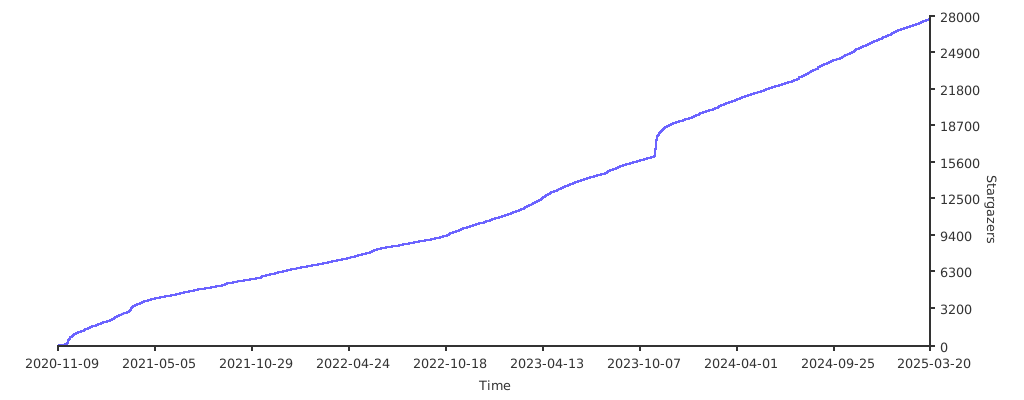
Stargazers over time